How to start a Community wifi Business in your erea
May 18, 2026
Community Wifi
100 views
4 min read
How To Start A Community Wi-Fi Business in Zimbabwe
Community Wi-Fi businesses are growing rapidly across Zimbabwe as more people look for affordable and reliable internet access in neighborhoods, schools, business centers, and rural communities. With the right equipment and planning, you can start a small hotspot network and grow it into a profitable internet business.
This guide explains the equipment, setup, business model, and practical steps needed to launch your own community Wi-Fi business using MikroTik hotspot systems.
1. Understand How a Community Wi-Fi Business Works
A community Wi-Fi network works by purchasing internet bandwidth from an Internet Service Provider (ISP) and redistributing it wirelessly to customers.
Internet Provider → MikroTik Router → Wireless Tower → Customers
Customers connect to your hotspot and purchase internet access using vouchers or monthly subscriptions.
2. Choose Your Business Model
Hotspot Voucher System
This is the most popular setup for small community networks. Customers buy vouchers with different time limits such as:
• 1 Hour
• 1 Day
• 1 Week
• 1 Month
This system works well in densely populated areas, shopping centers, schools, and residential communities.
Monthly Subscription Internet
You can also offer fixed monthly packages to households and small businesses.
• 5 Mbps — $15/month
• 10 Mbps — $25/month
• 20 Mbps — $40/month
3. Get a Reliable Internet Connection
Your entire network depends on having stable internet from a reliable provider. Some commonly used providers in Zimbabwe include:
• Liquid Intelligent Technologies
• TelOne
• Dandemutande
• Utande
• Starlink
Choose a package with sufficient bandwidth and stable uptime.
4. Equipment You Need
MikroTik Router
A MikroTik router acts as the brain of the network. It handles:
• Hotspot login pages
• User authentication
• Voucher management
• Bandwidth control
• Traffic monitoring
Popular models include:
• RB750Gr3
• hAP ac²
• RB4011
Wireless Devices
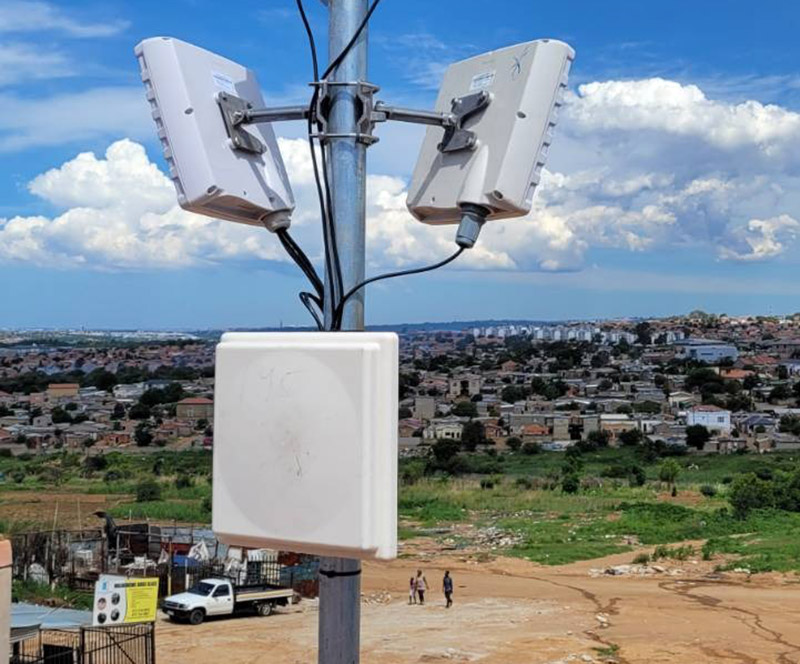
Wireless devices distribute internet to customers and relay stations.
• TP-Link CPE210
• TP-Link CPE510
• Ubiquiti LiteBeam
• Ubiquiti NanoBeam
Access Points
Access points broadcast Wi-Fi coverage to nearby customers.
• TP-Link EAP Series
• MikroTik cAP
• UniFi Access Points
5. Set Up Your Hotspot System
The hotspot system controls customer access to the internet.
Features include:
• Login pages
• Voucher authentication
• Speed limiting
• User monitoring
• Session tracking
Popular hotspot management tools include MikroTik Hotspot, Mikhmon, and User Manager.
6. Build Proper Network Coverage
Good coverage is essential for customer satisfaction. Install your equipment on:
• Tall buildings
• Water tanks
• Towers
• High poles
For large areas, you may need relay points and sector antennas to extend coverage.
7. Create Affordable Pricing Packages
Affordable pricing helps attract more users while remaining profitable.
Example Pricing:
• 1 Hour — $0.50
• 1 Day — $1
• 1 Week — $5
• 1 Month — $15 – $25
Always balance pricing with the quality and speed of your service.
8. Power Backup Is Very Important
Power outages can seriously affect your network uptime. A backup power system is highly recommended.
Recommended solutions include:
• Solar panels
• Deep-cycle batteries
• UPS systems
• Inverters
9. Market Your Wi-Fi Business
Promote your network both online and offline.
Offline Marketing
• Flyers
• Posters
• Local shop branding
• Community referrals
Online Marketing
• Facebook pages
• WhatsApp status updates
• TikTok videos
• Local Facebook groups
10. Common Mistakes To Avoid
• Poor tower placement
• Weak backup power systems
• No bandwidth management
• Overselling internet capacity
• Slow customer support
11. Skills You Should Learn
To run a successful hotspot business, learn the following:
• Winbox configuration
• IP addressing
• Hotspot setup
• Queue management
• Wireless alignment
• Basic MikroTik scripting
12. Estimated Startup Costs
• MikroTik Router — $50 to $200
• CPE Devices — $40 to $100 each
• Access Points — $50 to $150
• Tower or Pole — Variable
• Solar Backup System — Variable
• Internet Subscription — Monthly Cost
Conclusion
Starting a community Wi-Fi business in Zimbabwe can become a profitable and sustainable venture when done correctly. Begin with a small but stable setup, focus on good uptime and customer support, and reinvest profits into expanding your network.
With proper planning, reliable equipment, and good service delivery, your community hotspot network can grow into a trusted local internet provider.
Whether you are building a hotspot for your neighborhood, school, growth point, or business center, MikroTik hotspot systems provide a powerful and affordable foundation for creating a successful Wi-Fi business.
Community Wi-Fi businesses are growing rapidly across Zimbabwe as more people look for affordable and reliable internet access in neighborhoods, schools, business centers, and rural communities. With the right equipment and planning, you can start a small hotspot network and grow it into a profitable internet business.
This guide explains the equipment, setup, business model, and practical steps needed to launch your own community Wi-Fi business using MikroTik hotspot systems.
1. Understand How a Community Wi-Fi Business Works
A community Wi-Fi network works by purchasing internet bandwidth from an Internet Service Provider (ISP) and redistributing it wirelessly to customers.
Internet Provider → MikroTik Router → Wireless Tower → Customers
Customers connect to your hotspot and purchase internet access using vouchers or monthly subscriptions.
2. Choose Your Business Model
Hotspot Voucher System
This is the most popular setup for small community networks. Customers buy vouchers with different time limits such as:
• 1 Hour
• 1 Day
• 1 Week
• 1 Month
This system works well in densely populated areas, shopping centers, schools, and residential communities.
Monthly Subscription Internet
You can also offer fixed monthly packages to households and small businesses.
• 5 Mbps — $15/month
• 10 Mbps — $25/month
• 20 Mbps — $40/month
3. Get a Reliable Internet Connection
Your entire network depends on having stable internet from a reliable provider. Some commonly used providers in Zimbabwe include:
• Liquid Intelligent Technologies
• TelOne
• Dandemutande
• Utande
• Starlink
Choose a package with sufficient bandwidth and stable uptime.
4. Equipment You Need
MikroTik Router
A MikroTik router acts as the brain of the network. It handles:
• Hotspot login pages
• User authentication
• Voucher management
• Bandwidth control
• Traffic monitoring
Popular models include:
• RB750Gr3
• hAP ac²
• RB4011
Wireless Devices
Wireless devices distribute internet to customers and relay stations.
• TP-Link CPE210
• TP-Link CPE510
• Ubiquiti LiteBeam
• Ubiquiti NanoBeam
Access Points
Access points broadcast Wi-Fi coverage to nearby customers.
• TP-Link EAP Series
• MikroTik cAP
• UniFi Access Points
5. Set Up Your Hotspot System
The hotspot system controls customer access to the internet.
Features include:
• Login pages
• Voucher authentication
• Speed limiting
• User monitoring
• Session tracking
Popular hotspot management tools include MikroTik Hotspot, Mikhmon, and User Manager.
6. Build Proper Network Coverage
Good coverage is essential for customer satisfaction. Install your equipment on:
• Tall buildings
• Water tanks
• Towers
• High poles
For large areas, you may need relay points and sector antennas to extend coverage.
7. Create Affordable Pricing Packages
Affordable pricing helps attract more users while remaining profitable.
Example Pricing:
• 1 Hour — $0.50
• 1 Day — $1
• 1 Week — $5
• 1 Month — $15 – $25
Always balance pricing with the quality and speed of your service.
8. Power Backup Is Very Important
Power outages can seriously affect your network uptime. A backup power system is highly recommended.
Recommended solutions include:
• Solar panels
• Deep-cycle batteries
• UPS systems
• Inverters
9. Market Your Wi-Fi Business
Promote your network both online and offline.
Offline Marketing
• Flyers
• Posters
• Local shop branding
• Community referrals
Online Marketing
• Facebook pages
• WhatsApp status updates
• TikTok videos
• Local Facebook groups
10. Common Mistakes To Avoid
• Poor tower placement
• Weak backup power systems
• No bandwidth management
• Overselling internet capacity
• Slow customer support
11. Skills You Should Learn
To run a successful hotspot business, learn the following:
• Winbox configuration
• IP addressing
• Hotspot setup
• Queue management
• Wireless alignment
• Basic MikroTik scripting
12. Estimated Startup Costs
• MikroTik Router — $50 to $200
• CPE Devices — $40 to $100 each
• Access Points — $50 to $150
• Tower or Pole — Variable
• Solar Backup System — Variable
• Internet Subscription — Monthly Cost
Conclusion
Starting a community Wi-Fi business in Zimbabwe can become a profitable and sustainable venture when done correctly. Begin with a small but stable setup, focus on good uptime and customer support, and reinvest profits into expanding your network.
With proper planning, reliable equipment, and good service delivery, your community hotspot network can grow into a trusted local internet provider.
Whether you are building a hotspot for your neighborhood, school, growth point, or business center, MikroTik hotspot systems provide a powerful and affordable foundation for creating a successful Wi-Fi business.
About The Author
Experienced networking professional with years of expertise in telecommunications and network infrastructure solutions.
No comments yet. Be the first to comment!